Capitalyric Capitalyric
  • Accueil 
  • Besoin d’un crédit ? 
  • Qui sommes-nous ? 
  • Nous contacter 
  • Français 
    • Français 
    • English 
    • Deutsch 
    • Dansk 
    • Svenska 
    • Español 
    • Hrvatski 
    • Italiano 
    • Eesti 
Loading...
  1. Home
  2. Docy WordPress Theme
  3. Docy Options
  4. Page Options
Updated on mars 16, 2021
Docy WordPress Theme
  • Icône de dossier fermée Icône d’ouverture de dossierGetting Started
    • Theme Installation
    • Plugins Installation
    • Demo Import
  • Icône de dossier fermée Icône d’ouverture de dossierDocy Options
    • Page Options
    • Theme Settings
  • Icône de dossier fermée Icône d’ouverture de dossierDocumentation
    • Create Onepage Documentation
    • Footnote
    • User Feedback
    • Creating/Editing Documentation
    • How to create Changelogs
  • Icône de dossier fermée Icône d’ouverture de dossierBlog Part
    • TOC Layout
  • Icône de dossier fermée Icône d’ouverture de dossierTips
    • Updating The Theme
    • Optimize Images
    • Language Translations
    • Use the theme’s list style with Gutenberg block
    • How to create Sign in and Sign up pages
  • Icône de dossier fermée Icône d’ouverture de dossierUsing Shortcodes
    • [direction]
    • Conditional Content [conditional_data]
    • [terms]
  • Icône de dossier fermée Icône d’ouverture de dossierFAQ
    • How to Paginate a Post?
    • How to set the site’s favicon?
    • How to change the author’s avatar?
    • How to update premium plugins?
    • How to apply custom CSS code.

Page Options

Temps estimé :1 minute 570 vues

Docy Page Options get even more interesting in the creative process. These are a set of options that can be used on every single page or post, and will only affect the individual page you use them on.

Need one page to have a different background or different header layout than other pages? No problem, Docy Page Options to the rescue!

Page Options Override Theme Options To Allow Extreme Control Over Each Page Or Post. Theme Settings are global, page options are individual. This setup gives you amazing creative flexibility that becomes indispensable when you start creating your site. Having the option to freely choose how individual pages are styled is incredible freedom.

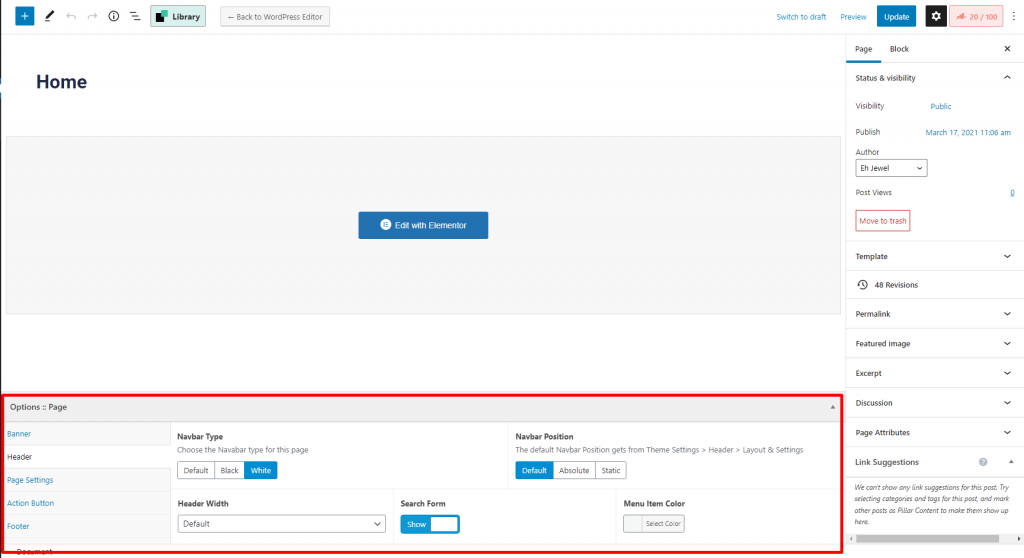
For example, you can choose an individual logo or header style for a specific page only from Docy Page Options. You can find the Page Options at the bottom of the WordPress page editor.
Still stuck? How can we help?

How can we help?

Was this page helpful? Oui 2 Non

Leave a Comment Annuler la réponse

Share this Doc

Page Options

Or copy link

Icône du presse-papiers
CONTENTS

Powered By EazyDocs

© 2017 Tous droits réservés par kreditonex